


Most people start their job search with a polished resume and a refreshed profile, but forget one place that matters, their LinkedIn settings. These settings were usually set months or years ago, back when they were not thinking about changing jobs. So when they start applying, things quietly break in the background.
Their profile does not get shared. Recruiters cannot see their interest. Job alerts show strange results. Recommendations feel random because LinkedIn has no real signal to work with. It looks like the platform is not helping them at all.
I see this often. Good candidates send many applications, but the system cannot read that they are active or open to new roles. It is not a talent problem. It is usually a small switch they never noticed.
The part that surprises many people is how hidden these settings are. They sit deep inside LinkedIn, far from the places job seekers check every day. So it is easy to miss them until it is too late.
Before you begin a job search, take a few minutes to review your Job Seeking Preferences. It is a simple step that can change your visibility in a real way.
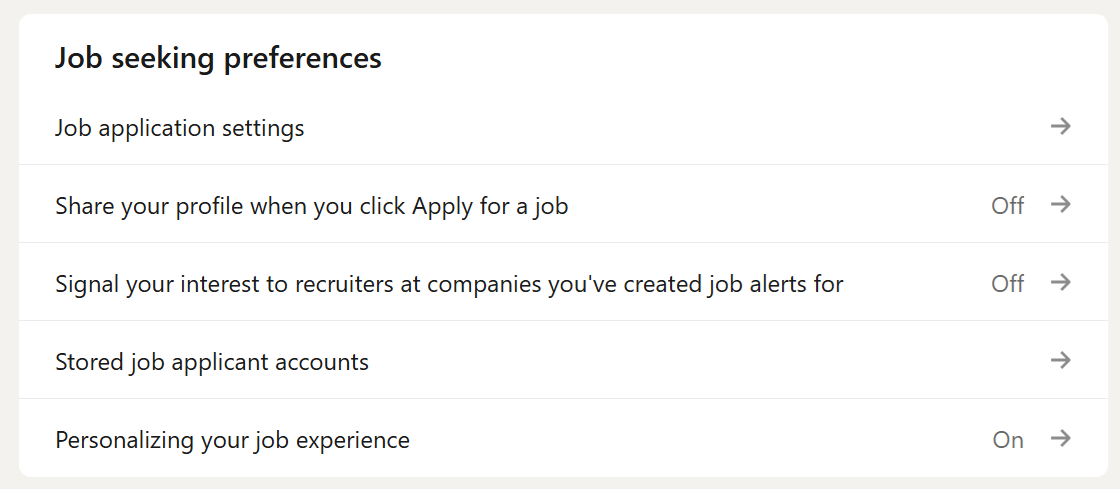
Those preferences are accessible directly from your LinkedIn profile page.
Click the Me icon in the top right
Go to Settings & Privacy
Open Job seeking preferences under the Data Privacy section
Why Your LinkedIn Settings Matter More Than You Think
When you apply for a job, you expect two things to happen. Your profile gets shared, and a recruiter can see that you are interested. Many people are surprised when neither of these things happens. The issue is not LinkedIn being confusing. The issue is that old settings silently block the signals that help recruiters find you.
LinkedIn works on signals. It looks at what you turn on, what you search for, and how your profile connects to a job description. These signals help the system decide who appears higher in search and who gets recommended. They also help recruiters understand who is active, who is open, and who is relevant for a role.
When those signals are off, your LinkedIn profile becomes invisible. You might still apply, but your profile might not reach the person who posted the job. Your interest might not show in their recruiter dashboard. Your job alerts might not match your actual skills. Nothing feels broken, but nothing works the way you expect.
Many job seekers never check these settings because they were set during a different stage of their career. They changed jobs, updated their profile, or explored roles out of curiosity, but never reviewed the switches that control how LinkedIn treats them during a real job search.
This is why small changes matter. A single toggle can decide if your profile is seen by a recruiter or stays buried behind hundreds of applications. Visibility is not only about keywords or profile strength. It is also about telling LinkedIn that you are here, active, and ready for new opportunities.
The Job Application Settings That Decide What Recruiters See
The first place to check is the section called Resumes and Application Data. Most people skip it because it looks technical, but it directly affects how recruiters view you during the hiring process. Two switches here control whether LinkedIn can save your application details and whether recruiters can see the information from your resume.
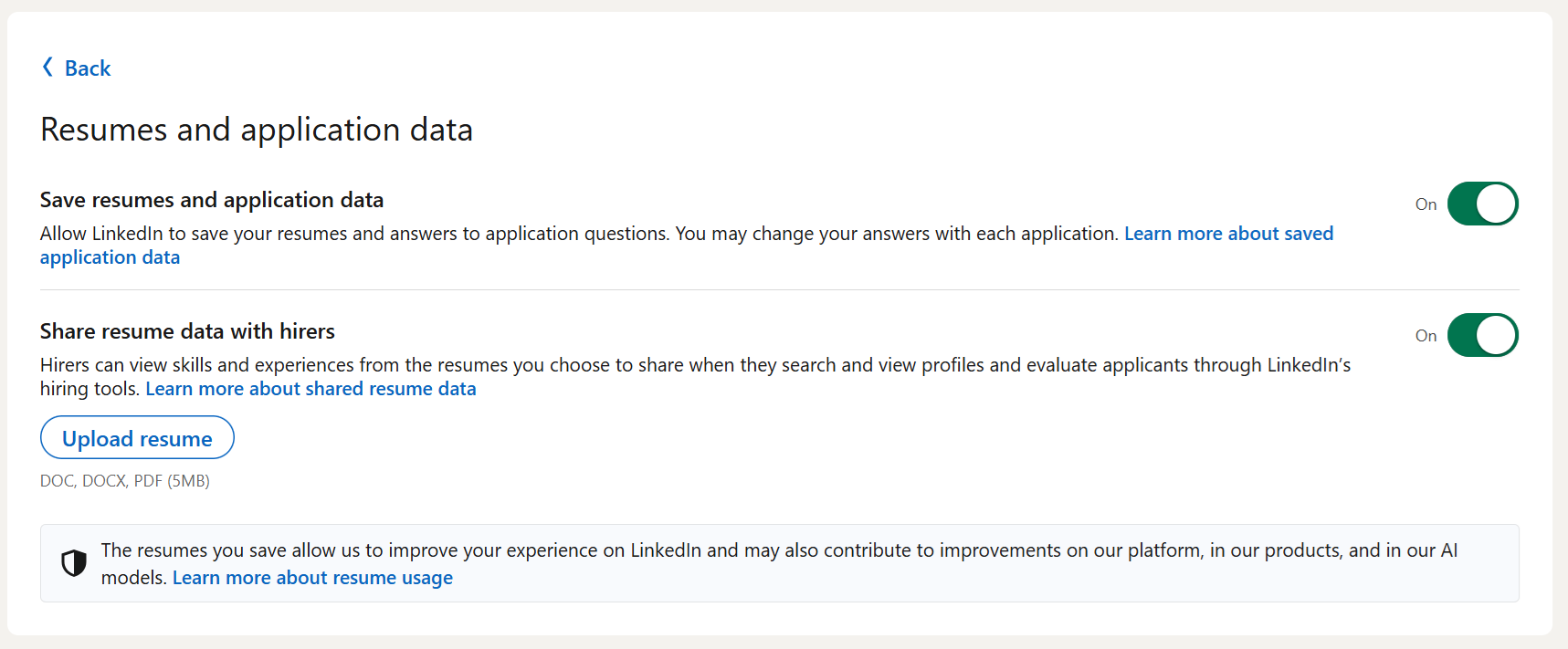
Save Resumes And Application Data
This setting tells LinkedIn if it can store the resumes and answers you submit when you apply for jobs. When it is on, LinkedIn remembers your files and the details you provided. This helps you move faster when applying again, and it also gives LinkedIn more accurate information about your skills and experience.If this is off, LinkedIn forgets everything you submit. You will need to upload your resume each time, and LinkedIn will not use your previous answers to help recommend jobs or match you with roles.
Share Resume Data With Hirers
This setting matters even more. When it is on, recruiters can view key information from your saved resumes when they look at your profile in LinkedIn’s hiring tools. It helps them see your skills, your job history, and the type of roles you have recently applied for.When it is off, recruiters only see your public profile. They miss the details that your resume covers, such as accomplishments, tools, or specific responsibilities. This makes your profile look thinner than it really is.
Both switches work together to help recruiters get a clearer picture of you. Leaving them off limits what they can see and slows down your job search. Turning them on gives them more context and helps LinkedIn show you to the right people.
The Hidden Switch That Shares Your Profile When You Apply
One of the most overlooked settings is Share with job poster, when you click apply for a job. It looks simple, but it solves a problem many job seekers do not even know they have.
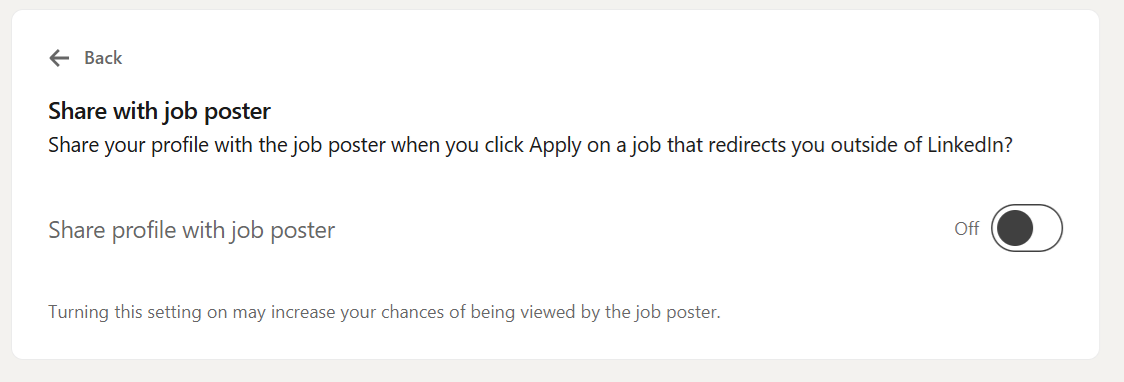
When you apply for a job on LinkedIn, some roles keep you inside the platform. Others redirect you to an external site. This usually happens with large companies that use their own career portals.
If this setting is ON, your LinkedIn profile is shared with the job poster the moment you click Apply, even if you leave LinkedIn and finish the application somewhere else. This means the recruiter can still see who you are and that you showed interest.
If this setting is OFF, your profile is not shared at all when the job sends you outside LinkedIn. You might complete the full application on the company site, but the recruiter never sees your LinkedIn profile unless they find you manually. Many never do.
This is why candidates sometimes think their application went nowhere. They applied correctly, but LinkedIn never passed their profile to the person who posted the role.
There are very few situations where turning this off makes sense. Most job seekers gain nothing from hiding their profile. Keeping this switch on helps you stay visible, especially when companies rely on LinkedIn’s tools to track interest from applicants.
It is a small toggle that prevents your effort from disappearing into a system that cannot connect your application back to your LinkedIn identity.
The Signals That Tell Recruiters You Are Interested
Another important section in Job Seeking Preferences is the option called “Signal your interest to recruiters at companies you’ve created job alerts for.” Many people scroll past it without thinking about what it does. It matters more than it seems.
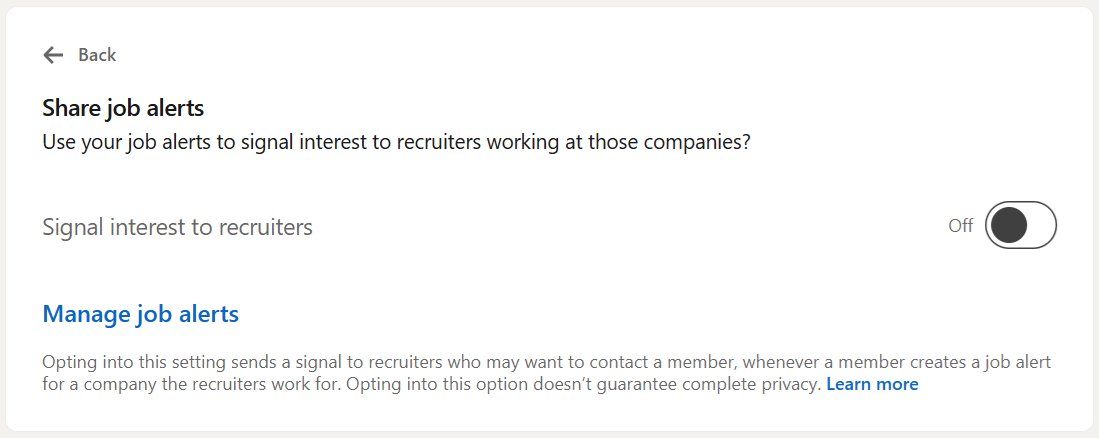
When this setting is on, LinkedIn sends a small signal to recruiters at companies where you created job alerts. The signal tells them that you follow their roles and might be open to talking. It does not share private activity. It does not say that you applied. It only shows that you are paying attention to their jobs.
This helps in two ways:
First, recruiters can see a list of people who are already interested in their company. When they need to fill a role fast, they often check this list before sending out new searches. If you are there, you get a better chance of contact.
Second, LinkedIn uses this signal to rank you higher for certain roles when your skills match the job.
When this setting is off, you still get job alerts, but no signal reaches the recruiter. You look passive, even if you check their postings every week.
Privacy is a common concern, but this feature shares very little. Recruiters only see interest from people who created alerts for their company. It does not reveal anything about your current employer or your job search activity outside that alert.
If you are open to new roles, this setting helps you move closer to the companies you care about. It is a simple way to raise your visibility without sending a single message.
Personalizing Your Job Experience And Why It Changes Your Results
There is another setting that looks harmless but shapes almost everything you see on LinkedIn. It is called “Use your data to recommend jobs.” Most people leave it off without realizing how much it affects their search.
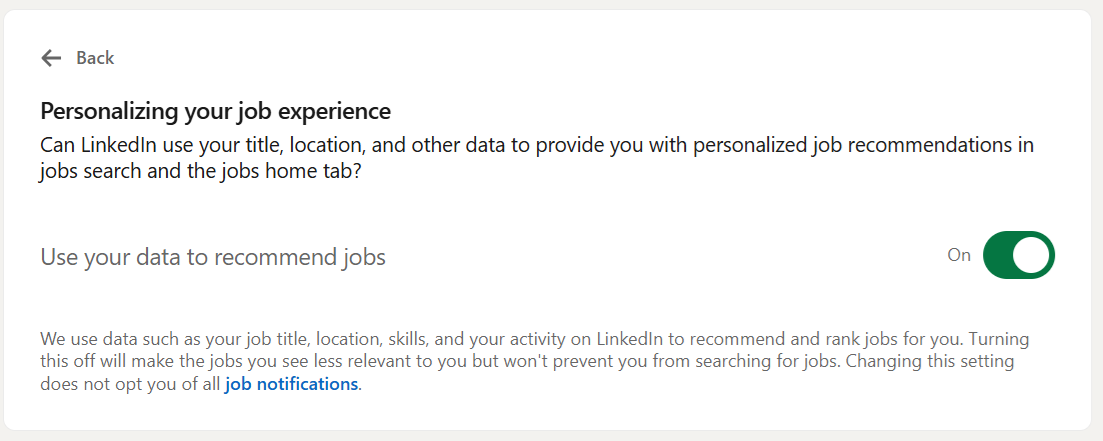
When this setting is ON, LinkedIn uses the information in your profile, your skills, your searches, and your recent activity to recommend roles that match your background. It also ranks these roles in a way that makes sense for you. The more signals you give, the more accurate the recommendations become.
When this setting is OFF, LinkedIn stops personalizing your job feed. You get a wide mix of roles, many of which do not match your skills or level. Alerts become noisy. Recommendations feel random. It is not that LinkedIn is bad at finding jobs. It is that the platform has no permission to use your data to guide the results.
This matters because recruiters often look at candidates who appear in the recommended pool for their open roles. If your data does not feed into that system, you miss out on visibility you could have had.
LinkedIn personalizes based on simple signals, such as:
• skills you added
• the titles you search for
• the jobs you clicked on
• your location and preferences
• the content you follow related to your field
Turning this setting on does not fix everything, but it helps the platform understand what you want. It reduces noise and brings forward roles that match your direction. When you are job searching, clarity saves time, and good recommendations help you spot opportunities you might have missed.
Clearing Confusion About Stored Job Applicant Accounts
Many people get confused when they reach the section called “Stored job applicant accounts.” It sounds technical, and the name creates questions that do not need to be there. This part of LinkedIn is simpler than it looks.
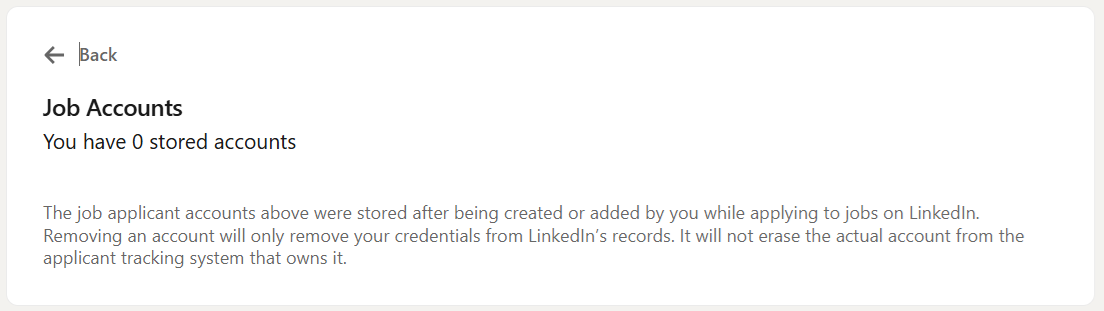
A stored applicant account is just a record of the information you saved for a company when you applied for one of their jobs through LinkedIn. Some companies allow you to create an account during the application process, usually to track your status or reuse your details later. LinkedIn shows these accounts so you can manage them in one place.
Most people have zero stored accounts, and that is normal. It does not mean you did anything wrong. It just means the companies you applied to did not create accounts for you on their side.
Having stored accounts does not influence your job search. Removing them does not delete anything from a company’s hiring system. It also does not remove your previous applications. It only clears the saved login or profile information linked to that employer.
Stored accounts can help when you apply to the same company again. They save you time because the company’s system already knows who you are. If you remove them, you simply re-enter your details the next time.
This section is more about convenience than visibility. The important settings are the ones above it. Still, knowing what this page does helps you understand that nothing here affects whether a recruiter sees you. It is only a list of saved application profiles, not a list of decisions, evaluations, or outcomes.
The Small Visibility Fixes That Help You Get Noticed
A strong profile helps you tell your story, but the right settings help your story reach the people who make hiring decisions. Most candidates never think about this. They update their resume, refresh their skills, and send applications, but the signals LinkedIn uses to surface their profile stay switched off from years ago.
Once the right settings are on, your activity starts to make sense to the platform. Recruiters see your interest. Your profile is shared at the right moment. Your alerts match the roles you care about. Your recommendations improve because LinkedIn understands what you want.
Here is a simple review checklist you can use before starting your job search.
• Share profile when applying, on.
• Share resume data with hirers, on.
• Signal interest for companies you created alerts for, on.
• Personalize job recommendations, on.
These switches cannot replace a strong resume or targeted applications, but they make sure your effort counts. They help you show up in the places where decisions begin. A few minutes in settings can move you from invisible to visible, and visibility is the start of every real opportunity.
There is a part of LinkedIn that most job seekers never see. It decides who appears first in recruiter searches and who gets filtered out before a human ever looks. If you want to understand how LinkedIn quietly ranks you, and how you can improve that ranking, the next section is for you!
