


97%. That’s the share of rows in my LinkedIn connections file that have both a company name and a real job title: about 29,100 out of 30,000. The other 3% are mostly quotes, slogans and claims like “Helping founders scale” sitting where a job title should be.
Those two columns are the reason anyone downloads the file. In December, LinkedIn takes them out of the export.
LinkedIn announced the change with a single line of grey text under the “Request archive” button and didn’t bother with a blog post or a press release. I wrote about it on Full Stack Recruiter last week, and shared it on social sites. And the replies made it clear that most people, and people looking for work, still haven’t seen it.
A few other things changed on LinkedIn and on X in the last few weeks, too. Put together, they push me toward advice I didn’t expect to give job seekers going into 2027, which is to own a small corner of the internet that no platform can edit for you.
But I’ll get into that more toward the end of this article.

Grab your Connections file before December
The notice on the export page says that as of December 2026, your data download will no longer include your connections’ email addresses, current companies, or job titles. LinkedIn only says “December.” Several outlets report December 20 as the date, and I wouldn’t plan around the last possible day. Do it this weekend.
Searching for a job? This file shows you who works at which company, making it easy to find the right people to ask for a referral. So download it!
You’ll keep names and profile links. So you’ll still know who you know. What you lose is the ability to sort those people by where they work and what they do, and for a job seeker that’s the whole value of the file. The first list I tell anyone in a search to build is simple: everyone I already know at the companies I want to work for. With the current export, that takes ten minutes in a spreadsheet. After December, you’d have to open hundreds of profiles one by one, and nobody does that, they just give up on the list.
Why is LinkedIn doing it? They haven’t said. My read, and it’s only my read, is that this CSV is one of the easiest ways for LinkedIn data to walk out the door. People upload it into CRMs and sourcing tools, and every one of those uploads is LinkedIn data working somewhere LinkedIn doesn’t get paid.
Meanwhile, companies that track recruiting software renewals report that Recruiter Corporate seats went up about 15% for 2026. A free spreadsheet of who works where competes with that product. To be fair, the email column was a privacy problem from day one, so some of this may be exactly what it looks like.
Getting the file takes a few clicks:
Go to Settings & Privacy, then Data privacy, then “Get a copy of your data.”
Pick the larger archive. The small one is faster and useless for this.
Wait. LinkedIn’s help page says the email with the download link arrives within 24 hours, and the link works for 72 hours.
Download the ZIP and unzip it on your own computer.
You may get two emails, the first one with the smaller file. Wait for the second one. And don’t request it the evening before you leave for a week somewhere without Wi-Fi, because the link will expire while you’re gone.
Once you have it, open Connections.csv, filter the Company column by the 20 employers on your target list, and save a copy somewhere outside LinkedIn. That’s the job. Then actually message a few of them, which is the part the spreadsheet can’t do for you and the part most people skip after doing all the exporting.
If you live in the EU, EEA or Switzerland, the notice points you to LinkedIn’s Member Data Portability APIs, which require setting up a developer app. There’s a whole separate conversation about whether that’s a real alternative, and I’m not getting into it here. For almost every job seeker I know, it’s more work than the problem deserves.
The other 47 files
My own export had 48 CSV files with names like Votes.csv and Security_Challenges.csv, and LinkedIn explains none of them. Most are activity logs of things you already did. A few are worth ten minutes of your time.
Inferred_Credibility_Scores.csv is the one I’d open first. It shows how LinkedIn scores you on knowledge topics and skills, and a score of 1.00 means it found no expertise at all. Mine covered 117 topics. If you’re a finance person and LinkedIn scores you 1.00 on the exact area you want to be hired for, you’ve learned what its systems believe about you, which may differ from what your profile says. Inferences_about_you.csv was shorter, two lines in my case, one of them a guess at my gender based on my first name.
Ad_Targeting.csv still listed old groups like “Jobs in Poland,” which I’d stopped thinking about years ago. I spent longer than I’d like to admit trying to remember why I joined it. I never figured it out.
I went through all of this file by file in What LinkedIn Knows About You, and the export change itself is in LinkedIn Hoped You Wouldn’t Notice.
One thing I can’t answer yet. LinkedIn’s new version of Hiring Assistant, its AI recruiting agent, started rolling out to customers in November. It finds candidates, judges how well they fit a role and tells recruiters who to contact. Do those credibility scores feed into it? LinkedIn hasn’t said, and I haven’t seen anyone show it either way.
Bold, at last
Some accounts now have a real bold option in the post composer. A few people I know already have it, and most don’t yet. LinkedIn usually tests features like this with a group of accounts first and widens it over a few weeks, so expect it on your account soon rather than today. As recently as October, the guides that checked still said there was no native bold in posts.

This sounds like a cosmetic change. For job seekers it’s a little more than that. The bold text you’ve been seeing in the feed for years is a set of Unicode math characters that only look like bold letters. Screen readers stumble over them, and search treats them as different characters from normal ones. If you put your key skill in fake bold, you made it harder to find. Native bold is real formatting, so search and screen readers handle it the way you’d expect.
When it lands on your account, stop using the bold generators, at least for anything you want to be found for. And bold one line, maybe two. A post where every third sentence is bold reads like someone shouting at a networking event.
X just added a work history section, and I changed my mind about it
A year ago I’d have told most job seekers that X was a poor use of their time unless they worked in tech or crypto. I’m less sure of that now.
On November 24, Benji Taylor, head of design at X, showed off a new Work Experience section on profiles. Each entry lists a job title, company, employment type and dates, with the company’s logo next to it. You need a paid subscription to add it, but anyone can see it. Before this, people put @mentions of their employer in their bio, which is messy for a human and worse for a machine.
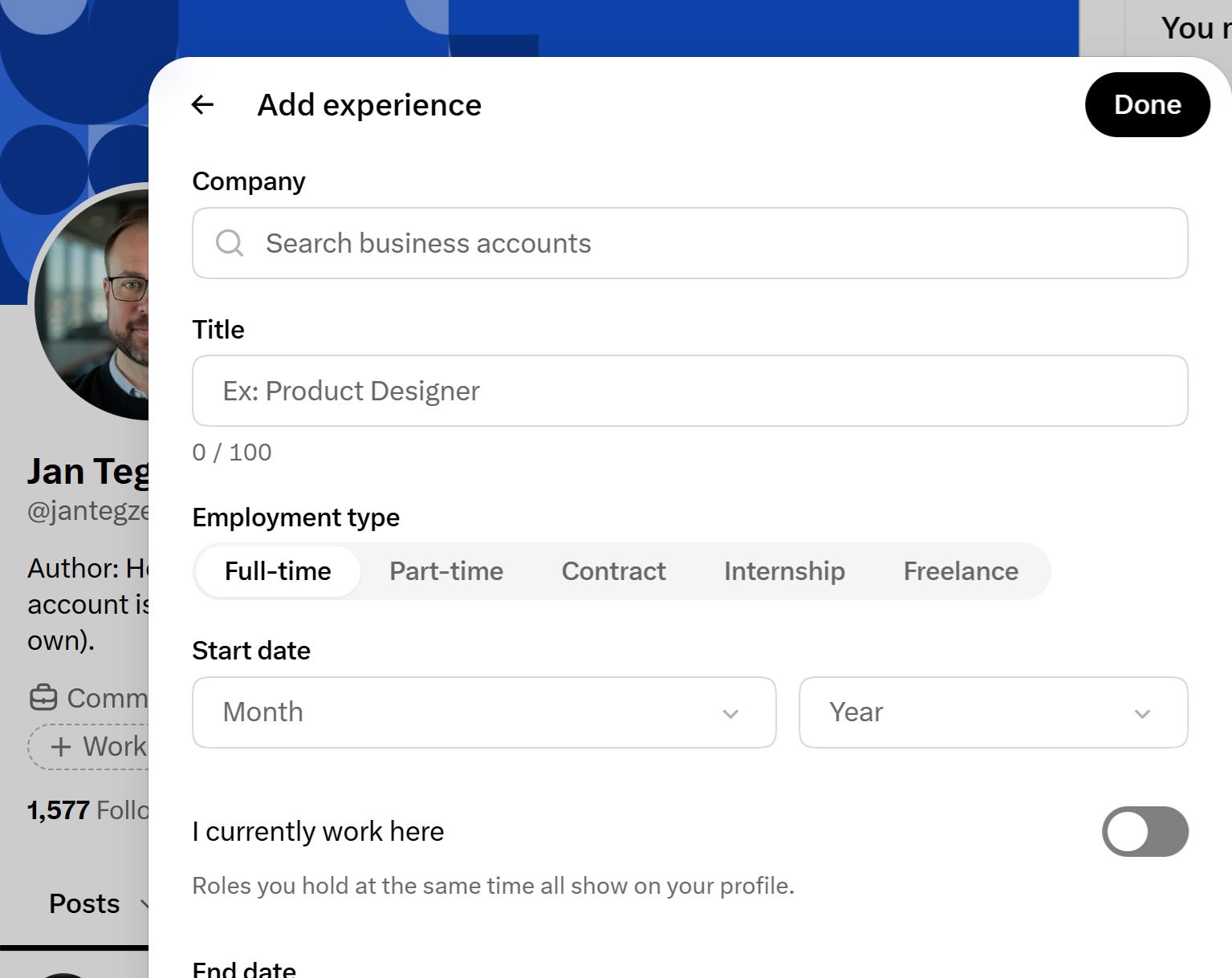
What changed my mind is the situation on the other side of the table. Sourcing tools live on data about who works where. LinkedIn is making that data harder to take out and more expensive to search inside its own product, and companies paying more at every renewal start asking their vendors where else they can find people. A public profile with structured fields for title, company, start date and employment type is exactly the kind of source those tools look for. If you fill it in, you show up in places your LinkedIn profile may stop reaching.
I could be wrong about how fast this happens. I don’t know yet which sourcing vendors will index X work history, but I’m starting to see some do it.
It’s a bet on where recruiters will look next year, and it costs you a subscription fee plus time on a platform that plenty of people find unpleasant. If you can’t stand X, I won’t pretend the upside is big enough to make you. Since I already pay for X to use Grok, this feature came with my subscription, so I added it to my X profile to see what would happen.
If you’re in tech, look at Peerlist too. It’s a community-led professional network built around work profiles, aimed at developers, designers, product people and founders. Outside tech, I don’t know it well enough to recommend it.
And I’d stay away from Facebook and the rest of Meta’s tools for your job search. My reasons are part privacy and part personal taste, and I’ll leave it there.
If I were searching for a job in 2027, this is the one thing I would do by the end of this year: